
Índice rápido (4 secciones)
Cuando la gente busca en Google o YouTube 'cómo hacer un video bailando con IA' o 'cómo cambiar a una persona por otra en un video', casi siempre termina probando apps antiguas que solo recortan la cara y la pegan encima del cuerpo original. El resultado suele verse falso: el cuello cambia de color, el cuerpo no coincide con la persona y las manos atraviesan el rostro.
En 2026, el estándar para lograr videos virales —como poner a Erling Haaland en esmoquin y a Kylian Mbappé en traje azul bailando juntos una tendencia de TikTok— funciona de forma totalmente distinta. Usando Higgsfield AI, subes el video original del baile como fuente de movimiento (@Video 1), adjuntas las fotos de referencia de cada persona (@Imagen 1 front y @Imagen 2 back) y aplicas un Prompt Maestro de reemplazo estricto que cambia cuerpo, ropa, calzado y canto (lip-sync) conservando intacto el fondo y la cámara.
Video Original (E82) vs. Resultado con Haaland & Mbappé (HF)
Las 2 imágenes exactas que reemplazaron a los bailarines:

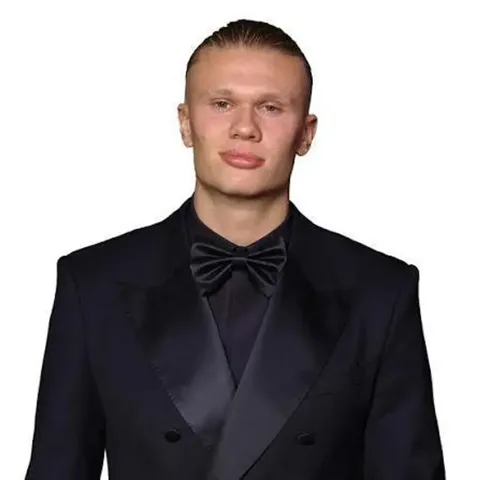
Erling Haaland (Personaje de Adelante)
Conserva esmoquin negro, corbatín, peinado recogido y facciones en todos los ángulos.

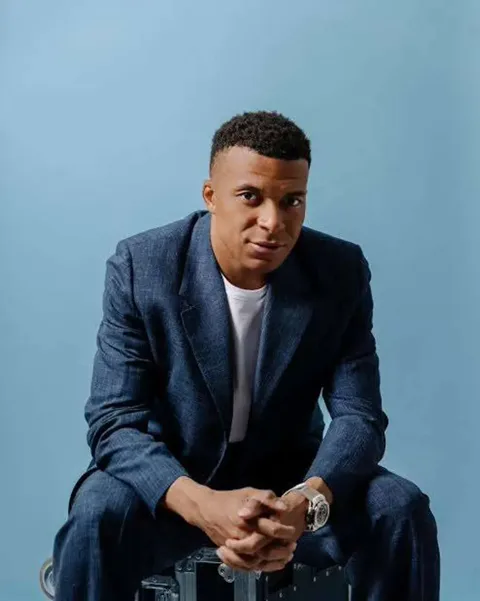
Kylian Mbappé (Personaje de Atrás + Lip-Sync)
Conserva traje azul, camiseta blanca, reloj plateado y sincroniza los labios con la canción.
Prompt Maestro de Bloqueo de Identidad y Movimiento (Higgsfield AI)
STRICT CHARACTER + CAR + CARD SWAP — IMAGE-REFERENCED EDIT

Perform ONLY the requested replacements and modifications using the original video and the reference images provided at the end of this prompt.

1. CHARACTER SWAP

Old Man Character → Kylian Mbappé (Image 1)

Replace the old man character with Kylian Mbappé, using Image 1 as the exact identity reference.

Preserve Mbappé's reference appearance exactly:
- Face and facial structure
- Eyes, nose, lips, and jawline
- Skin tone
- Hair and hairstyle
- Body proportions
- Clothing and visible accessories shown in Image 1

Do NOT blend the old man's face with Mbappé.
Do NOT retain the old man's facial features.
Do NOT alter Mbappé's identity or reinterpret his reference appearance.
Maintain consistent identity, clothing, anatomy, and appearance throughout every frame.

Back Girl Character → Erling Haaland (Image 2)

Replace the back girl character with Erling Haaland, using Image 2 as the exact identity reference.

Preserve Haaland's reference appearance exactly:
- Face and facial structure
- Eyes, nose, lips, and jawline
- Skin tone
- Hair and hairstyle
- Body proportions
- Clothing and visible accessories shown in Image 2

Do NOT blend the girl's appearance with Haaland.
Do NOT retain the girl's facial features.
Do NOT alter Haaland's identity or reinterpret his reference appearance.
Maintain consistent identity, clothing, anatomy, and appearance throughout every frame.

2. MBAPPÉ LIP-SYNC

Mbappé must naturally lip-sync to the vocals in the existing background song.
Synchronize his mouth movements as accurately as possible with the actual vocal timing, lyrics, phonemes, and rhythm of the original audio.

Requirements:
- Accurate vocal-to-mouth synchronization
- Natural jaw and lip movement
- Appropriate mouth shapes for spoken or sung phonemes
- Subtle, realistic facial movement
- No exaggerated mouth movements
- No random talking
- No delayed or drifting lip-sync
- No mouth distortion
- No facial identity changes during singing

Preserve Mbappé's identity and facial structure during every mouth movement.
Do NOT replace, remix, regenerate, mute, or otherwise modify the original background audio. Keep the existing audio completely unchanged.

3. CAR SWAP

Replace the two existing cars with the two car reference images supplied with the editing materials.
Existing Car 1 → Provided Car Reference 1
Existing Car 2 → Provided Car Reference 2

Use each car's corresponding reference image as the exact visual design reference.

Preserve each reference car's:
- Exact model and design
- Body shape and proportions
- Dimensions and silhouette
- Paint color and finish
- Wheels and tires
- Windows and lights
- Grille, trim, and distinctive design elements
- Visible interior details

Place both replacement cars in the exact positions and orientations of their corresponding original cars.

Preserve the original:
- Perspective and scale
- Camera-to-car relationship
- Reflections and environmental lighting
- Shadows and road contact
- Motion, movement, and motion blur
- Occlusion and depth relationships

The cars must look naturally integrated into the original footage.
Do NOT modify the road, environment, background, camera, or surrounding objects.
Do NOT mix the designs of the two cars or allow either car to change model, color, or shape between frames.

4. PLAYING CARDS — COLOR CHANGE ONLY

The playing cards already present in the original video are correct.
Use the exact cards from the original footage. Do NOT replace, regenerate, or redesign them.

ONLY change the colors of Card #2 and Card #4.
Card #2 → Change its color only.
Card #4 → Change its color only.
Every other card → Leave completely unchanged.

Preserve the original cards' exact:
- Shape and dimensions
- Thickness and perspective
- Texture and material
- Graphics and symbols
- Typography and markings
- Card backs and borders
- Animation and movement
- Position, rotation, and orientation

Apply the color changes as realistic recoloring of the original card surfaces, preserving the existing design, shading, highlights, shadows, reflections, texture, and material properties.
The new colors must remain stable across all frames and follow the original cards' lighting and perspective.
Do NOT introduce new graphics, symbols, patterns, borders, or visual elements.
Do NOT change the color of any card other than Card #2 and Card #4.
If the intended target colors are specified separately, use those exact colors. Do not arbitrarily recolor other cards.

5. ORIGINAL VIDEO LOCK

Everything not explicitly listed for modification must remain faithful to the original video.

Preserve:
- Original scene and environment
- Background and surroundings
- Camera angle and movement
- Framing and composition
- Lens perspective
- Lighting and shadows
- Reflections and atmosphere
- Depth of field and motion blur
- Relative positions of objects and characters
- Spatial relationships
- Interactions between elements
- Timing and choreography
- Physics and natural motion
- Original background audio, voice, music, and sound design

Do NOT introduce new camera angles, pans, zooms, cuts, or scene transitions.
Do NOT replace or alter the background environment, walls, trees, sky, or props.
Do NOT alter the pacing, choreography, gestures, or duration of the scene.
Do NOT regenerate elements that do not require replacement.

6. FRAME-BY-FRAME TEMPORAL AND ANATOMICAL CONSISTENCY

Maintain strict visual and structural consistency across all frames.

Ensure:
- Stable character identity throughout the entire sequence
- Proper anatomical proportions and human physics
- Consistent clothing, fabrics, textures, and accessories across all frames
- High structural stability from frame to frame
- Smooth and natural transitions between movements
- Consistent car designs, colors, textures, and reflections throughout
- Stable card colors matching the approved changes across all frames
- Consistent lighting on all added and modified elements matching the original scene
- Correct shadows that naturally track characters, cars, and objects

7. ZERO CUTS — ZERO GLITCHES

Keep the original video as one continuous, seamless sequence.

Strictly avoid:
NO CUTS
NO HARD EDITS
NO SUDDEN TRANSITIONS
NO CAMERA JUMPS
NO FLICKERING
NO MORPHING
NO POPPING ARTIFACTS
NO JITTER
NO WARPING
NO BLURRY FRAMES
NO UNNATURAL MOTION JUMPS
NO DISAPPEARING ELEMENTS
NO GHOSTING
NO TEXTURE CRAWL
NO FACE MORPHING
NO IDENTITY DRIFT
NO BODY DEFORMATION
NO CAR DEFORMATION
NO CARD DEFORMATION
NO EXTRA OBJECTS
NO MISSING OBJECTS
NO DUPLICATED CHARACTERS
NO TEMPORAL ARTIFACTS
NO AUDIO CHANGES

Preserve the original frame rate, duration, timing, and visual continuity.

8. FINAL REPLACEMENT MAP

Old Man → Kylian Mbappé, using Image 1
Back Girl → Erling Haaland, using Image 2
Car 1 → Provided Car Reference 1
Car 2 → Provided Car Reference 2
Card #2 → Original card design, color changed only
Card #4 → Original card design, color changed only
Mbappé → Natural lip-sync to the existing background song
All other elements → Preserve the original video

9. REFERENCE IMAGES — IDENTITY LOCK

IMAGE 1 — KYLIAN MBAPPÉ REFERENCE
@Video 1
Use Image 1 exclusively as the identity and appearance reference for the Old Man → Mbappé replacement. Match the visible facial features, hairstyle, skin tone, proportions, and clothing as closely as the reference permits.

IMAGE 2 — ERLING HAALAND REFERENCE
Use Image 2 exclusively as the identity and appearance reference for the Back Girl → Haaland replacement. Match the visible facial features, hairstyle, skin tone, proportions, and clothing as closely as the reference permits.

CAR REFERENCE 1: Attach the first car reference image with the editing materials.
CAR REFERENCE 2: Attach the second car reference image with the editing materials.

FINAL INSTRUCTION: Use the original video as the source of truth for the scene, timing, camera, choreography, cards, and audio. Use Image 1 for Mbappé's identity and Image 2 for Haaland's identity. Use the two car reference images for the car replacements. Change only the colors of Card #2 and Card #4 while preserving their original designs. Make no other changes.

@Imagen 1 front @Imagen 2 back
1. Qué necesitas antes de generar tu video bailando con IA
Para obtener exactamente el mismo nivel de calidad que ves en el reproductor de arriba (sin parpadeos en el fondo de madera ni deformaciones cuando las manos pasan frente a la cara), prepara estos tres archivos antes de abrir la herramienta:
- Video Base de Referencia (@Video 1): Un video vertical (9:16, 720p o 1080p a 24/30 fps) donde los movimientos del baile se vean claros y la iluminación no tenga parpadeos extremos. En nuestro caso usamos el video de referencia 'E82' donde dos jugadores bailan frente a una cerca de madera.
- Foto 1 — Personaje Delantero (@Imagen 1 front): Una fotografía nítida de la primera persona (en el ejemplo, Erling Haaland con esmoquin negro y corbatín). Importante: la IA tomará tanto su rostro como su ropa de esta foto.
- Foto 2 — Personaje Trasero (@Imagen 2 back): Una fotografía clara de la segunda persona (en el ejemplo, Kylian Mbappé sentado con traje azul oscuro, camiseta blanca y reloj plateado). La IA reconstruirá el resto del traje y los tenis blancos de forma coherente cuando aparezca de cuerpo entero.
2. Paso a paso: Cómo armar el video en Higgsfield AI
Sube el video original y las 2 fotos en el orden correcto
Entra al editor de video por referencia en Higgsfield AI. Carga primero el video de la coreografía como '@Video 1'. Luego adjunta la foto de la persona que quieres adelante como 'Imagen 1' y la foto de la persona de atrás como 'Imagen 2'.
Pega el Prompt Maestro de Bloqueo de Identidad (9 Bloques)
En lugar de pedir 'haz que bailen', pega el prompt estructurado en inglés que te dejamos arriba. Los modelos de video entienden con mucha mayor precisión las restricciones negativas en inglés ('Do NOT blend faces', 'ORIGINAL VIDEO LOCK', 'ZERO CUTS — ZERO GLITCHES').
Etiqueta las posiciones al final (@Imagen 1 front @Imagen 2 back)
Cuando hay dos personas en pantalla y se cruzan durante el baile, la IA necesita saber a qué plano de profundidad pertenece cada foto. Por eso cerramos el prompt con la línea '@Imagen 1 front @Imagen 2 back'.
3. Cómo funciona cada parte del Prompt Maestro (y cómo adaptarlo a tus fotos)
El prompt que usamos en el ejemplo es una plantilla profesional de estudio ('Strict Character + Car + Card Swap — Image-Referenced Edit'). Está dividida en 9 secciones para blindar el video contra alucinaciones. Así puedes adaptarla en 30 segundos si quieres poner a tus amigos, a un cliente o a cualquier personaje:
Anatomía del Prompt Maestro y qué cambiar según tu video
1. CHARACTER SWAP
2. LIP-SYNC
3. CAR & 4. CARD SWAP
5. ORIGINAL VIDEO LOCK
6. & 7. CONSISTENCY + ZERO GLITCHES
8. & 9. FINAL MAP + @Imagen front/back
Sección del Prompt | Para qué sirve en la IA | Qué debes editar tú | Impacto si lo borras |
|---|---|---|---|
| 1. CHARACTER SWAP | Reemplaza cuerpo, rostro, peinado y ropa usando la Foto 1 y Foto 2 sin mezclar facciones del video original | Cambia 'Kylian Mbappé' y 'Erling Haaland' por la descripción o nombre de tus 2 fotos | ALTO (La IA mezclará la cara nueva con el cuerpo viejo) |
| 2. LIP-SYNC | Sincroniza los labios y la mandíbula con la letra de la canción original sin dañar el audio | Indica cuál de los personajes debe cantar la canción de fondo | El personaje abrirá la boca a destiempo o sin ritmo |
| 3. CAR & 4. CARD SWAP | Bloques modulares por si el video original tiene autos o tarjetas/objetos en escena que quieras reemplazar o recolorear | Si tu video es solo de baile sin autos ni cartas, puedes dejarlos o borrarlos; no afectan el fondo si no hay esos objetos | Bajo (Solo aplica en videos con vehículos u objetos en mano) |
| 5. ORIGINAL VIDEO LOCK | Congela el fondo, las plantas, el piso, la iluminación, el movimiento de cámara y el audio original | No cambies nada: déjalo idéntico siempre | ALTO (El fondo cambiará de forma en cada segundo) |
| 6. & 7. CONSISTENCY + ZERO GLITCHES | Prohíbe cortes falsos, parpadeos, manos extra o cambios de ropa cuando los bailarines giran | No cambies nada: es el escudo anti-deformación | ALTO (Aparecerán glitches cuando las manos tapen la cara) |
| 8. & 9. FINAL MAP + @Imagen front/back | Conecta cada archivo subido (@Video 1, @Imagen 1 front, @Imagen 2 back) con su posición en pantalla | Asegúrate de que '@Imagen 1 front' sea la foto del de adelante y '@Imagen 2 back' la del de atrás | ALTO (La IA invertirá los personajes a mitad del baile) |
4. Plantilla limpia lista para copiar si solo vas a cambiar 1 o 2 personas bailando
Además del prompt completo que tienes en el reproductor interactivo de arriba, aquí tienes la versión directa por si quieres copiarla rápidamente desde el celular y cambiar únicamente los nombres de los personajes:
💡 Pega este prompt en Higgsfield AI adjuntando el video original (@Video 1) y las dos fotos de referencia (@Imagen 1 front y @Imagen 2 back).
Si necesitas escalar creativos similares con actores consistentes, derechos comerciales limpios y entrega en 48 horas para pauta activa, revisa nuestro servicio de producción de videos y comerciales con IA en Colombia o consulta las tarifas transparentes por paquete.
Q1¿Con qué inteligencia artificial se hacen los videos virales de personas o famosos bailando?
Q2¿Higgsfield AI es gratis o cobran por hacer videos de baile?
Q3¿Qué necesito para poner una foto a bailar como en un video de TikTok?
Q4¿Cómo evito que la cara o las manos se deformen cuando la persona baila con IA?
Q5¿La IA también hace que el personaje cante la canción del video original (Lip-Sync)?
Q6¿Puedo poner a bailar a cualquier persona o cliente para un comercial de mi marca?
Producción de Comerciales y Anuncios con IA en 48 Horas
Creamos tus creativos para TikTok y Meta Ads con avatares hiperrealistas, locución natural en español y ganchos de 3 segundos listos para pautar.
Añade a bran-d. como tu fuente preferida en Google para recibir nuestras guías de IA y videos en tus resultados y resúmenes.
[ SEGUIR EN GOOGLE ]